

1.2.1 List of Assets, Asset form
1.2.2 Acquisition, acquisition journal entry
1.2.4 Technical improvement – revaluation
1.2.5 Disposal, Disposal Journal Entry
1.2.1 List of Assets, Asset form
System path: (Classic centre) Fixed Assets > Lists > FAM – Assets
The list of Assets is available in mentioned path. The list is NS saved search. The is customizable, there is possibility to add other columns, remove not needed column, change sorting. It is possible to turn on Edit mode, which allowed to update data in columns in online regime. Therefore is allowed to add Available filters , like are Asset type, depreciation methods, Acquisition date etc.
List of Assets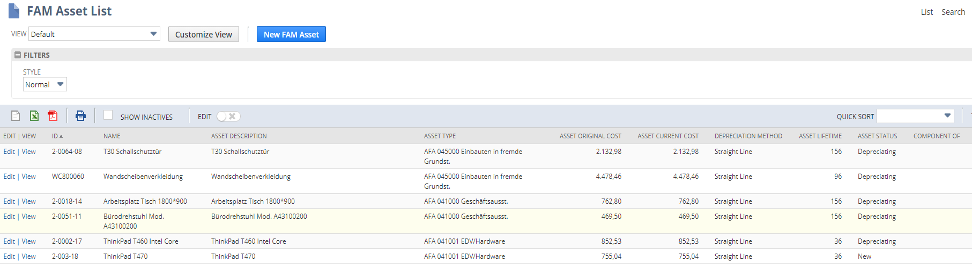
Clicking on the Edit or View link in the list of Asset is allowed to work with Form of Asset. If there is subsidiary where are more books the general subtab and asset form is related with primary book and is expressed in currency of primary book. Other books use the alternate method for record depreciation.
There are available following fields:
| Field | Mandt. | Description |
| Primary information | ||
| CUSTOM FORM | x | Choose form. For Avast is prepared with prefix Avast |
| ID | x | ID of FAM |
| Name | x | Name, short description |
| INACTIVE | Asset is not available editing, but existing records of asset can appeared in reports, saved searches | |
| ASSET DESCRIPTION | Detailed description | |
| ASSET SERIAL NUMBER | ||
| ALTERNATE ASSET NUMBER | ||
| PARENT ASSET | If the asset is a component of a collection of assets this indicate parent asset which this asset belongs. | |
| ASSET TYPE | x | Each asset must belong to the asset type. Asset type is used to categorise asset |
| ASSET ORIGINAL COST | x | Purchase cost of the asset |
| ASSET CURRENT COSST | Cost where are applied all write-down amounts | |
| RESIDUAL VALUE PERCENTAGE | The percentage value of the original cast which the asset is worth at the end of its lifetime | |
| RESIDUAL VALUE | x | The value which the asset is worth at the end of its lifetime |
| ACCOUNTING METHOD | x | Depreciating method which is used to depreciate this asset |
| ASSET LIFETIME | x | The expected time of the asset life |
| DEPRECIATION PERIOD | The frequency of the depreciation is only show. It is derived from depreciation method. | |
| ASSET LIFETIME USAGE | The depreciation of the asset is governed by the use of the asset. (e.g. vehicle mileage) | |
| CURRENT NET BOOK VALUE | ||
| CUMULATIVE DEPRECIATION | The total depreciation amount | |
| ASSET STATUS | The status of the asset | |
| CUSTOMER LOCATION | The location of the customer from whom the asset was purchased | |
| General | ||
| FUNCTION/CC | x | Classification |
| BUSINESS UNIT | x | Classification |
| LOCATION | Classification | |
| SUBSIDIARY | ||
| CURRENCY | The currency in which the cost of asset is expressed in. It is depended on the book. General subtab is related with accounting depreciation and primary book | |
| CUSTODIAN | The employee responsible for the asset | |
| PHYSICAL LOCATION | ||
| PURCHASE DATA | The date of purchase of the asset | |
| DEPRECIATION START DATE | x | The date of start depreciation |
| DEPRECIATION END DATE | x | The expected date of finishing depreciation |
| LAST DEPRECIATION PERIOD | The last period in which the asset was depreciated | |
| LAST DEPRECIATION AMOUNT | The value of the last depreciation | |
| LAST DEPRECIATION DATE | The date of the last depreciation | |
| TARGER DEPRECIATION DATE | ||
| DEPRECIATION ACTIVE | x | Option of status of depreciation
True False |
| ACQUSITION STATUS | Indicate whether the asset acquisition was recorded in the depreciation history. Acquisition journal entry is not created automatically it must be created manually | |
| REVISION RULES | It affects where is involved the calculation of revaluation process. Options are
Remaining Life Current period |
|
| MANUFACTURER | ||
| DATE OF MANUFACTURE | ||
| SUPPLIER | ||
| PURCHASE ORDER | The number of the transaction | |
| PARENT TRANSACTION | The number of the acquisition transaction | |
| PRIOR YEAR NBV | The asset’s net book value for the accounting method at the end of the prior financial year. Read only. | |
| ANNUAL METHOD ENTRY | Only for annual depreciation. Select when the depreciation is posted.
Anniversary – start depreciation date Fiscal year – last day of fiscal year |
|
| Accounts | ||
| ASSET ACCOUNT | The asset cost account (balance sheet) | |
| DEPRECIATION ACCOUNT | The account tracking cumulated depreciation | |
| DEPRECIATION CHARGE ACCOUNT | The expense account for depreciation charges by period | |
| WRITE OFF ACCOUNT | Account for asset write-off | |
| WRITE DOWN ACCOUNT | Account for asset write-down | |
| DISPOSAL COST ACCOUNT | Account for disposal expenses | |
| Tax Methods -Alternate Depreciation | ||
| ACCOUNTING BOOK | Select the accounting book which is associated with alternate depreciation. If is select the depreciation journal entry is created simultaneously with record of depreciation history. If is not selected is only created record to depreciation history. | |
| ALTERNATE METHOD | Select alternate method for accounting depreciation in other accounting book like primary
Select tax alternate depreciation method to create tax depreciation |
|
| DEPRECIATION METHOD | It is defaulted by alternate method | |
| ORIGINAL COST | It is sourced from the main asset record. If it is in another currency it is recalculated by exchange rate | |
| CURRENT COST | The current cost of asset. Firstly is sourced from the asset record | |
| RESIDUAL VALUE PERCENATGE | Percentage value of the asset at the end of its lifetime | |
| RESIDUAL VALUE | The value of the asset at the end of its lifetime | |
| ASSET LIFE | The expected asset life time | |
| BOOK VALUE | The current net book value | |
| CUMULATIVE DEPRECIATION | The total depreciated amount of the asset | |
| ASSET STATUS | The status of the depreciation method. It is set by system but can change
New Depreciating Fully depreciated Disposed Partially disposed |
|
| Asset Sale/Disposal | ||
| DISPOSAL ITEM | Sales item which is used on generation of invoice when the asset is sold | |
| DISPOSAL DATE | The date of disposal the asset | |
| DISPOSAL TYPE | Select type of disposal by which was asset disposed
Write-off Sales |
|
| CUSTOMER | The customer whom was the asset was sold | |
| SALES AMOUNT | The amount the asset was sold for | |
| SALES INVOICE | The number of sold transaction | |
| Depreciation History | ||
| TRANSACTION TYPE | Type of transaction which are saved in history | |
| ACCOUNTIN BOOK | Accounting book where is transaction posted | |
| ALTERNATE METHOD | Used tax depreciation and alternate depreciation method for other books | |
| DATE | Date of transaction | |
| PERIOD | Accounting period | |
| TRANSACTION AMOUNT | ||
| NET BOOK VALUE | ||
| QUANTITY | ||
| POSTING REFERENCE | Link to Journal entry | |
| DEPRECIATION POSTING REFERENCE | Link to depreciation journal entry | |
1.2.2 Acquisition, acquisition journal entry
Creation of a new Asset in FAM module is allowed by some ways. If it is bulk creation is appropriate way by CSV import. Will be described in next paragraph. Next ways are Asset proposal and Asset creation.
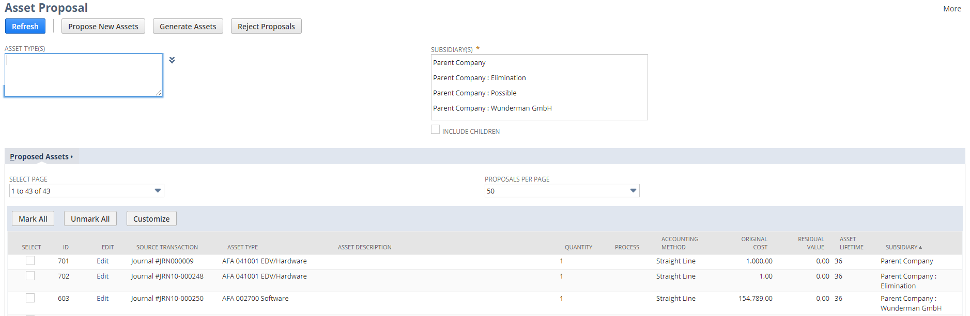
Asset Proposal
The Asset proposal enables to capture the original transaction where are indices and it is prepared suggestion for new assets.
System path to Asset proposal is: Fixed Assets > Transaction > Asset Proposal
Form for input data for proposal:
1.2.3 Asset depreciation
In the FAM module each asset must to be assigned a depreciation method in order to calculate the asset’s depreciation. The depreciation methods can be linked, it means that an asset can depreciate using one method for the first part of its lifetime and then to switch to a different method for the remaining lifetime. The module enables to maintain separate book depreciation and tax depreciation. The depreciation record of asset if linked to journal entry transaction. The accounting depreciation for primary book is set in subtab General. The accounting depreciation for other books is set through the alternate methods in the subtab Tax Methods. The tax depreciation are set in the same subtab but without enter the Accounting book field. All journal entries in the environment multi-book are book specific journal entries.
The depreciation is triggered in the system path: Fixed Assets > Transaction > Asset Depreciation
The entry form for triggering derpreciation process: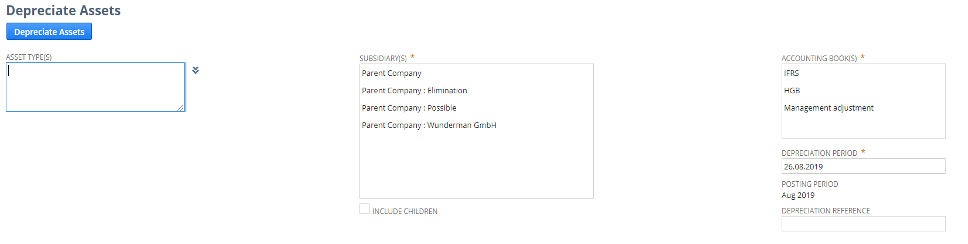
The list in subtab Depreciation history with depreciation records of history for each book with links to book specific journal entries.
1.2.4 Technical improvement – revaluation
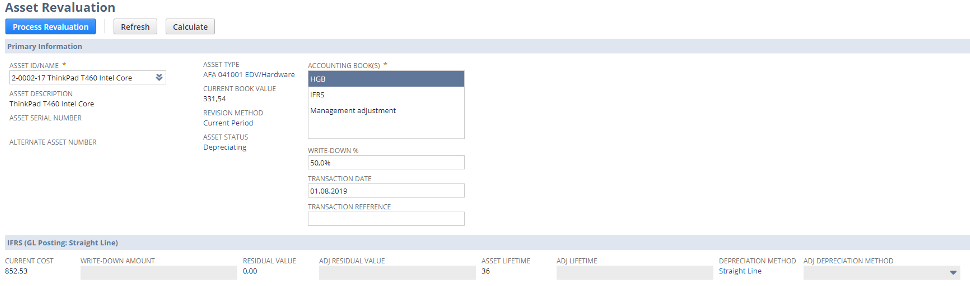
In the FAM module is possible use Asset Revaluation feature to write down or revaluate an asset. It allows to enter a new net book value for the asset and post the difference to the general ledger. Asset revaluation is supported only for accounting methods. It does not apply to alternate tax methods.
Asset Revaluation form for input data for revaluation
1.2.5 Disposal, Disposal Journal Entry
The FAM module enables to write -off or sell an asset. When a fixed asset is disposed an adjustment is made to the depreciation account and the accumulated depreciation . Disposing the asset by sale lets to enter and post the difference between the net book value and the value earned from the sale of the asset to the GL. A sale invoice is created by using the disposal item as the line item. The status of the asset is change to Disposed. During asset disposal the system creates depreciation history records they are linked with journal entries. Journal entry for disposal must be amended manually because is not adequate to Czech accounting standard.
Disposal can be executed by system path: Fixed Asset > Transaction > Asset disposal
Entry form for execution of disposal:
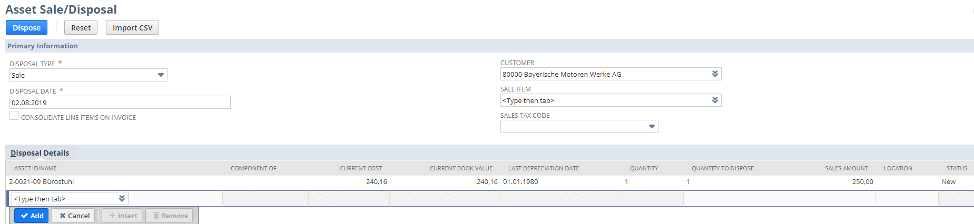
Following fields are available in the disposal form:
| Field | Description |
| DISPOSAL TYPE | The type by which the asset was disposed of
Write-off Sale Are possibility to generate others |
| DISPOSAL DATE | Date when the asset is disposed. Cannot be earlier than last depreciation date |
| CONSOLIDATE LINE ITEMS ON INVOICE | Check to sum up the amount of all assets for disposal and consolidate it into one single line. Clear to itemize each asset for disposal line in the invoice |
| CUSTOMER | The customer the asset was sold to |
| SALES TAX CODE | Applicable tax code |
| SALES ITEM | Non inventory sale item is used fo sale |
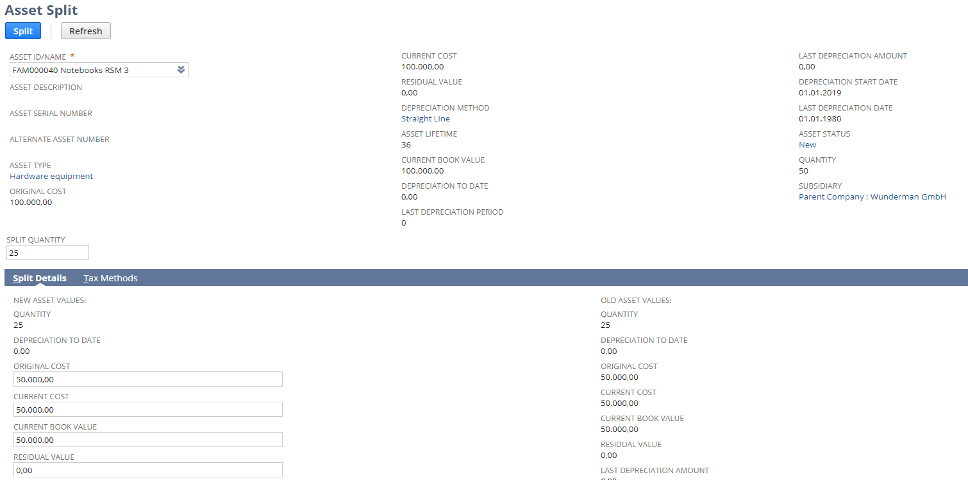
1.2.6 Asset split
The FAM enables to split asset which is not fully depreciated and quantity more than 1. The Asset split allows to specified quantity to be separated from the original asset and create a new asset. Asset depreciation continue to work on each asset as a whole.
The system path is: Fixed Assets > Transaction > Split asset