


List of content:
1.3.1 NS Solutions
FAM module enables to create reports under all fixed assets. It is important to know what exactly want to report because data is possible to obtain only from the specific Report type. Data from card are in Asset Register (Asset original cost, Purchase date etc.) but Deprecation amount for July is on the Depreciation Schedule Period Depreciation.
System path: Fixed Asset > Reports > Generate Reports
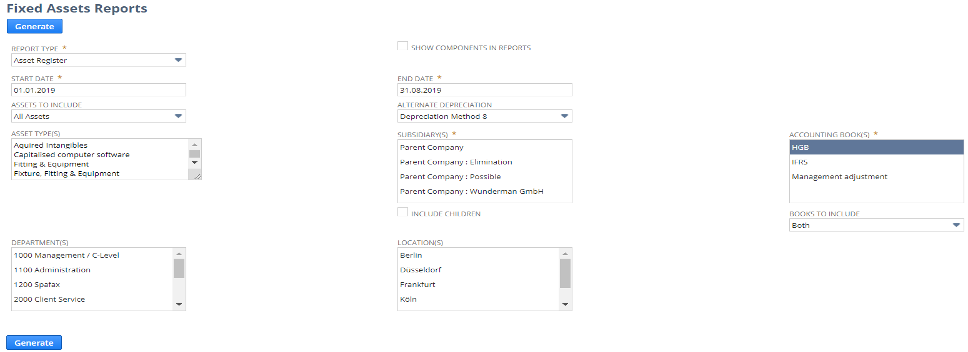
Following fields are available in the Reports form:
| Field | Description |
| REPORT TYPE | It is necessary to choice from:
Asset Register Asset Summary Depreciation Schedule NBV Depreciation Schedule Period Depreciation Depreciatoin Monthly Report Fixed Asset listing |
| START DATE/END DATE | Finding period between chosen dates |
| ASSETS TO INCLUDE | Three possibilities:
All assets All assets except Leasing Only Leasing |
| ASSET TYPES | Reports can be generated according to asset types |
| ALTERNATE DEPRECIATION | Reports can be generated according to depreciation methods |
| SUBSIDIARIES | Reports can be generated according to subsidiaries |
| ACCOUNTING BOOK | Reports can be generated according to Accounting book |
| BOOKS TO INCLUDE | Three possibilities:
Both GL Posting Non GL Posting |
| DEPARTMENTS | Reports can be generated according to Departments |
| LOCATION | Reports can be generated according to Location |
1.3.2 RSM Solution
Based on experience we prepare different solution how to report the assets. We prepare five types of saved searches that show all possibilities of FA:
| Type | Description | Name of Saved Search |
| ADDITIONS | Shows all new added assets before depreciating | WN_FA Additions Primary Book
WN_FA Additions Secondary Book WN_FA Additions Tax Book |
| AR | Shows all fixed assets | WN_FA AR Primary book
WN_FA AR Secondary Book WN_FA AR Tax Book |
| DEPRECIATION HISTORY | Shows all depreciation schedules that will be created on the assets | WN_FA Depreciation History Primary Book
WN_FA Depreciation History Secondary Book WN_FA Depreciation History Tax Book |
| DISPOSAL | Shows all disposal assets | WN_FA Disposals Primary Book
WN_FA Disposals Secondary Book WN_FA Disposals Tax Book |
| REVALUATION | Shows all asset thaw will be revaluated | WN_FA Revaluation – Primary book
WN_FA Revaluation – Secondary book WN_FA Revaluation – Tax book |
1.3.3 German Client Specific
| TANGIBLE ASSETS | Summary of all tangible assets | – Tangible Assets NBV (OC, CC, NBV, LDA*) |
| RIGHT OF USE | Summary of all Leased Fixed assets – Right of Used Assets | – Right of Use NBV (OC, CC, NBV, LDA*) |
| LEASING | Summary of all Lease Liabilities | – Liability NBV (OC, CC, NBV, LDA*) |
*OC – Original Cost, CC – Current Cost, NBV – Net Book Value, LDA – Last Depreciation Amount
Client CRT Reports are filtred by Asset types and Asset Account. Setting are below:
| Name of Saved Search | Asset Type | Asset Account |
| Intangible Assets NBV | – Capitalised computer software
– Capitalised computer software GWG – GOODWILL |
– Sofware
– Sofware GWG – GOODWILL KKLD* – GOODWILL DPK – GOOD WILL H & P |
| Tangible Assets NBV | – Hardware equipment
– Leases – Cars – Lease – Leasehold property – Hardware equipment GWG |
– EDV/Hardware
– EDV/Hardware GWG – Einbauten GWG – Einbauten in fremde Grundstücke – Geleist. Anzahlungen und Anl. im Bau – Geschäftsausstattung – Geschäftsausstattung GWG |
| Right of Use NBV | – Hardware equipment
– Hardware equipment GWG – Leases – Cars – Leases – Leasehold property – Office Equipment – Office Equipment GWG |
– Right-of-Use Asset
|
| Liability NBV | – Hardware equipment
– Leases – Cars – Leases – Leasehold property – Hardware equipment GWG |
– EDV/Hardware
– EDV/Hardware GWG – Right-of-Use Asset |