


Fixed Assets Management (FAM) SuiteApp provides management of fixed assets concurrently of current assets. The module covers whole life cycle of asset like are acquisition, depreciation, revaluation, technical improvement, insurance, disposal and provides a single source of information for everything relating to that asset. Because the Wunderman environment is multibook all transaction are posted in particular books and can be set up differently for particular book. Impact of all transaction is automatically involved in reports and statements like P&L or Balance sheet. Fixed Assets Management is standalone module of system which is closely linked to the system.
1.1.6 Alternate Depreciation methods
1.1 Setup
Asset module has its own setup and is important keep the sequence of steps in set up Assets.

1.1.1 System Setup
In system setup is general settings of FAM. How to summarize depreciation journals or if server scripts on CSV import will run and etc.
System path: (Classic centre) Fixed Assets > Setup > System setup
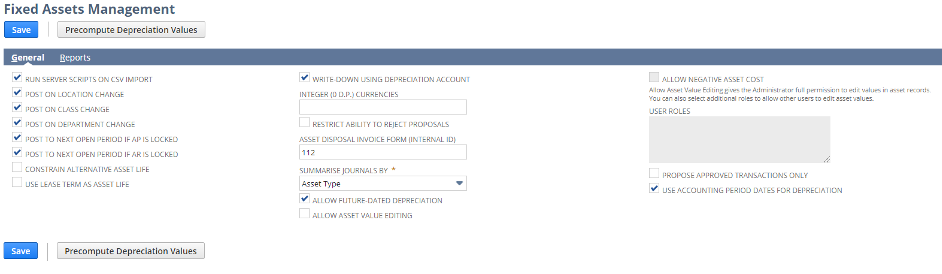
| Field Name | Description |
| RUN SERVER SCRIPTS ON CSV IMPORT | The checkbox is checked if is used CSV import to data acquisition |
| POST ON LOCATION CHANGE | Check the box to post journal entry if asset is transferred between product (location) |
| POST ON CLASS CHANGE | Check the box to post journal entry if asset is transferred between Business units |
| POST ON DEPARTMENT CHANGE | Check the box to post journal entry if asset is transferred between Cost Centre |
| POST TO NEXT OPEN PERIOD IF AP IS LOCKED | Check the box to allow posting to the next open period if AP account is locked |
| POST TO NEXT OPEN PERIOND IF AR IS LOCKED | Check the box to allow posting to the next open period if AR account is locked |
| WRITE DOWN USING DEPRECIATION ACCOUNT | If is box checked write-down amount is posted to depreciation account else is posted to the asset account |
| INTEGER (D.P.) CURRENCIES | Entre one or more currencies symbol where is used 0 decimal places |
| RESTICT ABILITY TO REJECT PROPOSAL | Check for purpose to reject system proposal |
| FOLDER TO USE FOR REPORTING | Internal ID of folder where are saved created reports |
| ASSET DISPOSAL INVOICE FORM | Internal ID of invoice form which is used by disposal |
| SUMMARISE JOURNALS BY | Option how summarise created journal entries |
| ALLOW FUTURE DATED DEPRECIATION | Check the box to allow depreciation up to date beyond that of the current period |
| ALLOW ASSET VALUE EDITING | Check the box to allow role administrator to edit value on the asset record after launch depreciation process |
| ALLOW NEGATIVE ASSET COST | Check the box to allow negative value in the asset cost field |
| USER ROLES | List of roles which have permission like administrator to edit value of asset record |
| PROPOSE APPROVED TRANSACTION ONLY | Check the box to propose the asset only from transaction that have been approved |
| USE ACCOUNTING PERIOD DATES FOR DEPRECIATION | NA in Avast conditions |
| BYPASS CUSTOM RECORD UE SCRIPTS DURING DEPRECIATION | NA in Avast conditions |
| ALLOW ADMINISTRATORS TO VIEW ALL REPORTS | Check to allow administrator to view reports generated by another users |
1.1.2 Setup permissions
FAM is established on custom record structure not on the standard record NS structure. This is reason why set up permission is different against standard module. The following table lists the record permissions is required to use the FAM features.
| Subtab | Permission | Level | Notes |
| Transactions | Make Journal Entry | Full | Processes such as Depreciation, Revaluation and Disposal run with client user permissions and need to create Journals |
| Transactions | Bills | View | |
| Transactions | Find Transaction | Full | |
| Transactions | Invoice | Full | |
| Custom Record | FAM — Alternate Depreciation | Full | |
| Custom Record | FAM — Alternate Methods | Full | |
| Custom Record | FAM — Asset | Full | |
| Custom Record | FAM — Asset Proposal | Full | |
| Custom Record | FAM — Asset Transfer Accounts | Full | |
| Custom Record | FAM — Asset Type | Full | |
| Custom Record | FAM — Asset Usage | Full | |
| Custom Record | FAM — Default Alt Depreciation | Full | |
| Custom Record | FAM — Depreciation History | Full | |
| Custom Record | FAM — Depreciation Method | Full | |
| Custom Record | FAM — Expense/Income | Full | |
| Custom Record | FAM — Last Proposal Dates | Full | |
| Custom Record | FAM — Lifetimes | Full | |
| Custom Record | FAM — Proposal Alt Depreciation | Full | |
| Custom Record | FAM — Repair & Maint Category | Full | |
| Custom Record | FAM — Repair & Maint Sub A | Full | |
| Custom Record | FAM — Repair & Maint Sub B | Full | |
| Custom Record | FAM — System Setup | Full | |
| Custom Record | BG — Process Instance | Full | |
| Custom Record | BG — Process Log | Full | |
| Custom Record | BG — Queue Instance | View | Add the permission to the custom role manually |
| Custom Record | BG — Summary Record | Full | |
| Lists | Accounts | View | |
| Lists | Business units | View | |
| Lists | Currency | View | |
| Lists | Customers | View | |
| Lists | Cost centres | View | |
| Lists | Documents and Files | View | |
| Lists | Locations | View | |
| Lists | Perform Search | View | |
| Lists | Projects | View | |
| Lists | Subsidiaries | View | |
| Lists | Tax Items | Create | |
| Lists | Items | View | |
| Setup | Accounting Book | View | |
| Setup | Manage Accounting Periods | View | |
| Set up | Setup Company | View |
1.1.3 Asset Types
Asset types categorize asset. Before is created asset record it is needed to have created asset type. Each asset must be assigned an asset type. The asset type defaults many variables, fields of the asset.
System path: (Classic centre) Fixed Assets > Setup > Asset types
Following fields are available in the Asset type form.
|
Main tab |
|
| NAME | Short name for clear identification |
| INACTIVE | Check to inactivate. It is available for reports, saved search. Not available for editing. |
| DESCRIPTION | Extensive description for more details |
| ACCOUNTING METHOD | Select the default accounting depreciation method for given type |
| RESIDUAL PERCENTAGE | The default percentage value for original cost which the asset has at the end of his lifetime |
| ASSET LIFETIME | The default expected lifetime for given asset type |
|
General subtab |
|
| DEPRECIATION ACTIVE | Indicates whether assets of this type is active and is included in the depreciation processing |
| INCLUDE IN REPORTS | Check default mark the asset is include to the purposes of reporting |
| REVISION RULES | Select how system defaults for given asset the calculation of the process revaluation. Options are
Current Period Remaining Life |
| DEPRECIATION RULES | Select for depreciation rules for given asset
Acquisition Disposal Mid-month Pro-rata |
| DEPRECIATION PERIOD | Select default period of depreciation
Monthly Annually |
| CUSTODIAN | The employee responsible for particular asset |
| SUPPLIER | The typical supplier of the given type of the asset |
| DISPOSAL ITEM | Select typical item for given type of asset |
| FINANCIAL YEAR START | Select month when start financial year |
|
Accounts subtab |
|
| ASSET ACCOUNT | Default account for given type |
| DEPRECIATION ACCOUNT | Default account for given type |
| DEPRECIATION CHARGE ACCOUNT | Default account for given type |
| WRITE OFF ACCOUNT | Default account for given type |
| WRITE DOWN ACCOUNT | Default account for given type |
| DISPOSAL COST ACCOUNT | Default account for given type |
| ASSET ACCOUNT LAST CHECKED | Default account for given type |
1.1.4 Asset Accounts
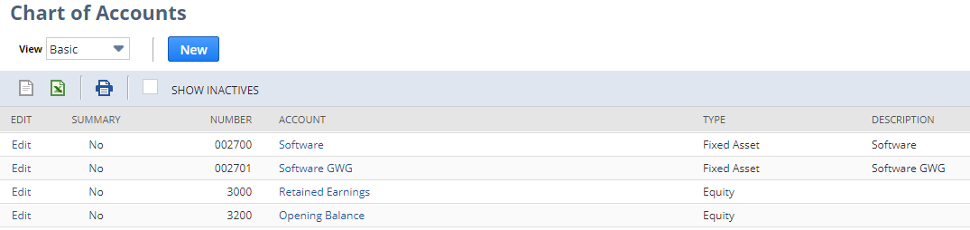
In asset types are used asset accounts, that accounts that are in chart of accounts. Account for Fixed asset has to be marked as type Fixed Asset. Without it, it can be choose in asset type.
1.1.5 Depreciation methods
Each asset has to be assigned a depreciation method in order to calculate the asset’s depreciation. Depreciation methods can be switch during the asset’s lifetime. It means that an asset can be depreciate using one method for the first part of its lifetime than can be switch to a different method for the remaining lifetime. The FAM enables to maintain separate book different depreciation methods. Book depreciation of fixed assets is linked to journal posting. In conditions Avast are created journals of type book specific.
System path: (Classic centre) Fixed Assets > Setup > Depreciation methods
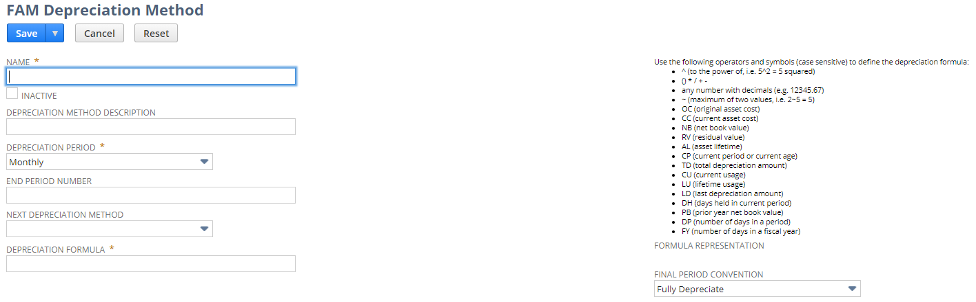
Following fields are available in the Asset form.
| NAME | Short description of the method |
| DEPRECIATION METHOD DESCRIPTION | Detail description of the method |
| DEPRECIATION PERIOD | The frequency at which depreciation under this method take place |
| END PERIOD NUMBER | Number of period that the method used for depreciation |
| NEXT DEPRECIATION METHOD | If the current depreciation method covers limited period in this fields is indicates the next depreciation method which take effect when the current method reaches its limit |
| DEPRECIATION FORMULA | Below is tab with shortcuts that are uses in formula |
| FINAL PERIOD CONVENTION | The field is to accruals only |
Following operators are available using in Depreciation formula
| Name | Description |
| OC | Original Asset Cost |
| CC | Current Asset Cost |
| RV | Residual Value |
| AL | Asset Lifetime |
| CP | Current Period or Age |
| TD | Total Depreciation Amount |
| CU | Current Usage |
| LU | Lifetime Usage |
| LD | Last Depreciation Amount |
| DH | Days held in current period |
| PB | Prior year net book value |
| DP | Depreciation Period |
| FY | Fiscal Year |
1.1.6 Alternate Depreciation methods
FAM enables to set up multiple alternate methods of depreciation for depreciation to another book like primary and therefore for purposes tax depreciation. Alternate methods for other books are linked to financial and there are journal entries posted. In the case tax depreciation are created records to depreciation history but are not created journal entries. Alternate methods are created on the basis depreciation methods respectively are derived from depreciation methods.
System path: (Classic centre) Fixed Assets > Setup > Alternate methods
Form for creating and editing Alternate methods
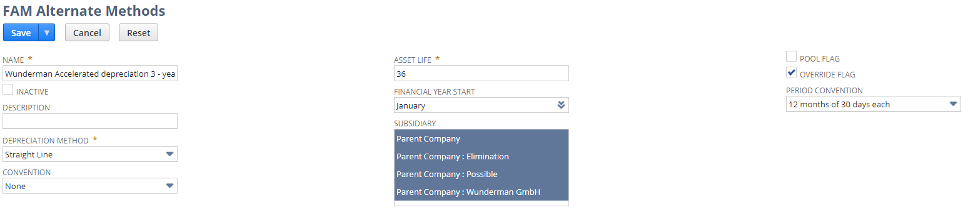
| NAME | Description |
| INACTIVE | Check to mark the alternate method inactive. It is available in reports and saved searches. It is not available to edit or chose in drop down list |
| DEPRECIATION METHOD | Select to assign particular depreciation method |
| CONVENTION | Conventions are supported for alternate methods only, and the default value is None. |
| ASSET LIFE | The expected asset life time |
| FINANCIAL YEARS START | Select the first month of the financial year |
| SUBSIDIARY | Select subsidiary/subsidiaries where can be alternate method used |
| POLL FLAG | Check if the method serve to depreciate group of assets |
| OVERRIDE FLAG | Check to allow override data of the method on the given asset |
| PERIOD CONVENTION | Select the convention used to define a year
Options are 12 months of 30 days each Exact number of days in month |