


The aim of the document is to describe new functionality brought by CZ bundle. New functionality contains connection from NetSuite ERP to European Central Bank (ECB) that will provide updated currency rates for specific currency.
The reference rates are usually updated by 15:00 CET on every working day, except on TARGET closing days. They are based on a regular daily concertation procedure between central banks across Europe and worldwide, which normally takes place at 14:15 CET.
ECB Currencies List
You must set what currencies you want to update from ECB. You can do it in menu „List > ECB Currencies > ECB Currencies List“. Then mark UPDATE EXCHANGE RATES BY ECB as YES at currency what you want to update.
ECB CURRENCY field must have same name as currency ISO CODE.
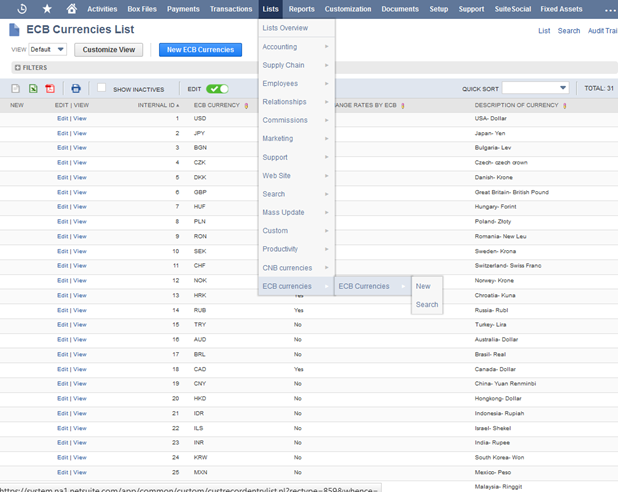
Picture 1– ECB currencies List
Schedule script
Script name is Import ECB exchange rates.
If you want to update exchange rates every day set script deployment as Picture 2.
If script will be scheduled multiple times a day (ECB server[1] could might be not available), script recognise it and currencies will updated only one times. This is because currencies history.
[1] http://www.ECB.cz/cs/financni_trhy/devizovy_trh/kurzy_devizoveho_trhu/denni_kurz.txt
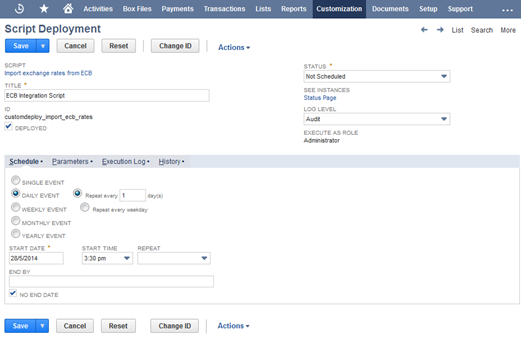
Set script status as scheduled.
Start time at 3:30 pm because current data from ECB are available after 3:00 pm.
Repeat every hour is important because, ECB server[1] could might be not available. Check no end date.
Update currencies first working day of the month
If you want to update exchange rates first work day of the month:
- In script deployment parameters mark check box Update first work day
- Actualize script parameter Current Month id: custscript_ecb_month. Parameter must be number of the month which currently is (for example set 1 if current month will be january, set 10 if current monht will be October).
Parameter could be set at the script deployment > Script Import ECB exchange rates > Parameters > number
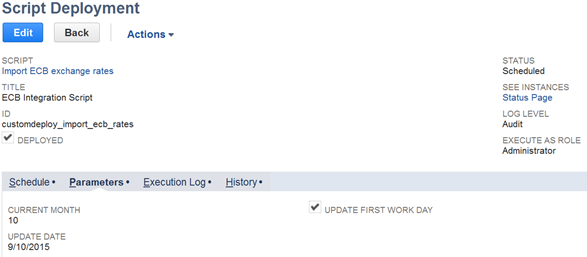
Picture 3 – Update first work day
- Schedule script every day (see picture 4)
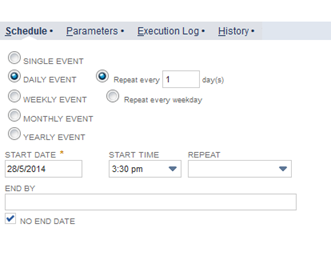
Picture 4 – Schedule
Set Time Zone
If you want to use different timezone of update than timezone: Europe/ Prague
Go to script deployment and Parameter could be set at the script deployment > Script Import ECB exchange rates > Parameters > Time Zone
If you want to use different Timezone you must add that time zone to script parameter Time zone.
Time zone must by in proper format see:
https://en.wikipedia.org/wiki/List_of_tz_database_time_zones
for example:
Australia/Sydney
or
Pacific/Honolulu